Lead Scoring for Small Businesses: A Simple Model You Can Set Up This Week
Build a practical lead scoring model in a week: pick five to eight signals, assign points, add negative scoring, set hot and warm thresholds and test it against your past deals.
By DigiPix Flow team · September 2026 guides, part 3 of 3
In this guide
Every morning, your sales team opens a list of new leads and decides who to call first. Without a system, they pick by gut feel, by time of arrival, or by whoever has the most familiar name. A lead scoring model replaces that guesswork with a simple number that tells your team which leads are most likely to buy.
You don't need a data scientist or months of setup. This guide shows you how to build a practical lead scoring model in a week, using information you already have.
What is lead scoring?
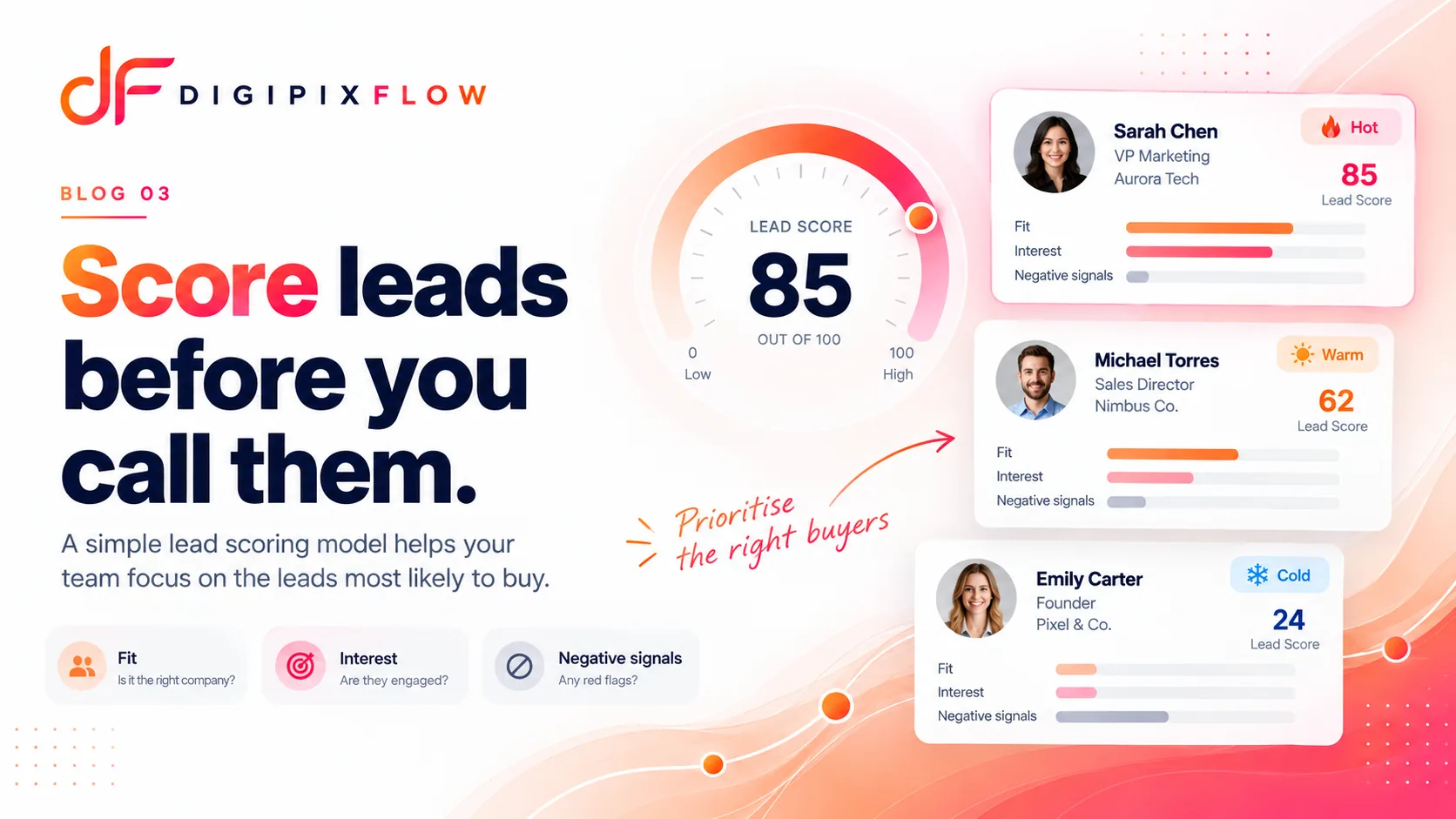
Lead scoring is a method of ranking leads by giving them points for characteristics and actions that suggest they're likely to buy. Leads with higher scores get attention first. A lead scoring model is simply the set of rules that decides how many points each signal is worth.
For example, a lead that came from a referral, asked for pricing and is based in your service area might score 80. A lead that downloaded a free guide from outside your area might score 20.
Fit and interest: the two halves of a lead score
Most lead scoring models combine two kinds of signals:
- Fit is about who the lead is. Do they look like your best customers? Examples: location, business type, company size, budget range, the product they asked about.
- Interest (sometimes called intent or engagement) is about what they're doing. Are they showing buying behaviour? Examples: asked for pricing, requested a callback, replied to a message, visited more than once, booked a meeting.
A lead with great fit but no interest is a future opportunity. A lead with high interest but poor fit may never be able to buy. The best leads score well on both.
How to build a lead scoring model in 5 steps
Step 1: Look at your last 20–50 won deals
Before you assign any points, look at the customers who actually bought. What did they have in common? Note the source they came from, where they're based, what they asked about first and how quickly they responded. These patterns become your scoring signals.
Then look at a similar number of lost or dead leads. What do they have in common? These become your negative signals.
Step 2: Choose 5–8 signals
Resist the urge to score everything. A small, clear model is easier to explain, test and trust. Pick the signals that showed the biggest difference between won and lost deals.
Step 3: Assign points
Give more points to stronger signals. Keep the numbers simple so anyone on the team can understand why a lead got its score.
Step 4: Set your thresholds
Decide which scores count as hot, warm and cold. For example: 70 and above is hot, 40–69 is warm and below 40 is cold. Each band should have a clear next step, like "call within the hour" for hot leads.
Step 5: Test, then review monthly
Apply your model to past leads and check the result. Did most of your won deals score as hot or warm? Did most of your lost leads score as cold? If not, adjust the points. Then review the model every month as you learn more.
A lead scoring model example
Here's an example model for a business that sells a service to other businesses. Adjust the signals and points to fit yours.
| Signal | Type | Points |
|---|---|---|
| Came from a referral | Fit | +25 |
| Located in your service area | Fit | +15 |
| Budget answer matches your price range | Fit | +20 |
| Asked about pricing or a quote | Interest | +20 |
| Requested a callback or meeting | Interest | +25 |
| Replied to your first message | Interest | +10 |
| Outside your service area | Negative | −30 |
| Student or job seeker, not a buyer | Negative | −40 |
| No response after three attempts | Negative | −15 |
Thresholds: 70+ = hot (call within the hour), 40–69 = warm (call today and add to a follow-up sequence), below 40 = cold (nurture with helpful content).
With this model, a referral in your area who asked for a quote would score 25 + 15 + 20 = 60, then move to hot (85) as soon as they request a callback.
Don't forget negative scoring
Negative scoring is often skipped, but it's one of the most useful parts of a lead scoring model. It pushes poor-fit leads down the list, so your team doesn't spend prime time on people who can't buy. Common negative signals include:
- A location you don't serve
- A job application or vendor pitch sent through the enquiry form
- Fake or invalid phone numbers and emails
- Repeated non-response
Common lead scoring mistakes
- Too many signals. If nobody can explain a score, nobody will trust it.
- Scoring only interest. Lots of activity from a poor-fit lead still doesn't lead to a sale.
- Setting it and forgetting it. Your market, offers and campaigns change. Your model should too.
- Scores with no action attached. A score is only useful if hot leads are actually called first. Connect scores to routing and follow-up.
- Keeping it secret from the team. Reps should know what drives a score, so they can record the right information.
Lead scoring vs lead qualification
Lead scoring and lead qualification do different jobs. Scoring is automatic and happens before anyone talks to the lead. It decides the order of calls. Qualification happens in the conversation. It confirms need, timing, authority and budget. The two work best together: scores decide who to call first, and qualification answers feed back into the score.
Lead scoring examples by industry
The best signals depend on what you sell. Here are starting points for four common types of business:
| Industry | Strong positive signals | Common negative signals |
|---|---|---|
| Real estate | Budget matches the project, preferred location matches, wants to buy within 3 months, requested a site visit | Budget far below inventory, looking to rent rather than buy |
| Coaching institutes | Enquired for an upcoming batch, asked about fees, attended a demo class, parent involved | Enquired for a course you don't run, wrong age group |
| Marketing agencies | Monthly budget above your minimum, clear goal, decision-maker on the call | Wants a one-off post, budget far below your minimum |
| D2C and wholesale | Large order quantity, repeat buyer, business buyer type, urgent timeline | Single-unit retail enquiry, outside delivery area |
Use these as a first draft only. Your own won and lost deals are the real guide. If your data shows that referrals from existing customers close far more often than any other source, give referrals more points, whatever the table says.
Start with the handful of signals that clearly separate buyers from browsers in your business, and add more only when you have evidence they matter.
How DigiPix Flow helps with lead scoring
DigiPix Flow's lead scoring is designed to let you run this kind of model without spreadsheets:
- Scoring rules that add, subtract or set points, so negative scoring is built in.
- Cold, Warm and Hot bands with thresholds you set, so everyone reads a score the same way.
- Rules read back in plain words, so reps can see what each rule adds or takes away.
- Assignment rules, workflows and segments that use the score, such as routing high scorers to your senior reps and alerting the owner when a lead turns Hot.
Your team's time is limited. Spend it on the right leads.
A lead scoring model doesn't have to be perfect to be useful. Even a simple version, with a handful of signals and three bands, gives your team a better starting point every morning than gut feel.
Want lead scoring that routes hot leads automatically? Talk to an expert and we'll show you how DigiPix Flow does it.
Frequently asked questions
What is a lead scoring model?
A lead scoring model is a set of rules that gives each lead points based on how well they fit your ideal customer and how interested they appear. The total score ranks leads, so your sales team can contact the most promising ones first instead of working through the list in the order leads arrived.
How many criteria should a lead scoring model have?
For most small businesses, 5–8 criteria are enough. Choose the signals that best separate your won deals from your lost ones. A short, clear model is easier to test, explain and trust than a complicated one with dozens of rules nobody understands.
What is negative lead scoring?
Negative lead scoring subtracts points for signs that a lead is unlikely to buy. Examples include a location you don't serve, a job application sent through a sales form, or repeated non-response. It keeps poor-fit leads from crowding out genuine buyers at the top of your list.
What score makes a lead "hot"?
There's no universal number. You set it. Many teams use a 0–100 scale and treat 70 or more as hot, 40–69 as warm and anything lower as cold. The right threshold is the one where most of your past won deals would have scored as hot or warm.
How often should I update my lead scoring model?
Review it monthly for the first few months, then quarterly. Compare scores with actual results. If high-scoring leads aren't converting, or low-scoring leads keep buying, adjust the points. Also update it when you launch a new product, campaign or market.
Put this guide into practice
See qualification questions, lead scoring and follow-up built into one workspace, using your own lead sources.